Posts

Showing posts with the label iPhone tethering

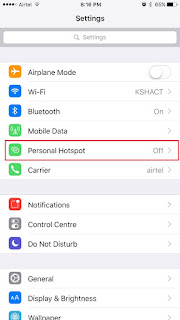
How to use iPhone 6S and iPhone 6S Plus as Mobile Wi-Fi Hotspot
Image
iPhone 6S and iPhone 6S Plus are the 2 latest flagship smartphones from Apple. It has got 4G high speed internet connectivity. Do you know, you can use iPhone 6S and iPhone 6S Plus as WiFi hotspot to your laptop or tablet?  Using WiFi hotspot feature you can share the mobile internet to other nearby wifi enabled devices wireless using iPhone as modem. Using iPhone 6S and iPhone 6S Plus mobile hotspot is very simple and does not take much time. It can be set up in less than 1 minutes. It is very easy to use and you can use it any time. But one thing you should always remember. Mobile Wi-Fi Hotspot uses mobile data. So you should be in network coverage area with data connection. Another important requirement is active data plan. Mobile Wi-Fi Hotspot uses your mobile data .Hence, it will drain your data allowance very quickly. So use it carefully. Otherwise your mobile bill will increase. In summary, whenever you are using  Mobile Wi-Fi Hotspot, make sure to keep your usag...

How to Use iPhone 6 as Personal Hotspot Modem

Image
iPhone 6 personal hotspot is a feature through which sharing the iPhone internet connection to other device such as iPad mini, iPad air, Nexus 6, Nexus 9 etc through WiFi, Bluetooth or a USB cable. To use iPhone 6 as modem, the device should be connected to the internet over the cellular data network. We will lean to use iPhone 6 as Personal Hotspot modem. How to Use iPhone 6 as Modem Note: This feature may not be available with all carriers. Additional fees may apply. Contact your carrier for more information. To share the data  connection of iPhone 6 with other devices, first you need to enable the personal hotspot. For that follow the steps given below. Go to Settings> Cellular, and then tap Personal Hotspot to enable it. After you turn on Personal Hotspot, other devices can connect in the following ways: Wi-Fi :On the device, choose your iPhone from the list of available Wi-Fi networks. USB :Connect iPhone to your computer using the cable that came with it. In...